
Following on from my recent post about regenerating my ProxyMan tool, I've now sorted out a fair bit of the engine. I can now apply just about all the rotational data in the motion capture file onto my character object. I've still got to find a solution for the spine and neck (I have some ideas, yet to be tested). And I still need to resolve his place in space - that is, I can rotate his arms etc. But I need to also move him around in 3D space. If I have a walk cycle, he needs to move forward. Once I've cracked these bits, then, we've just about got what we're after.
Video of the progress can be seen below.
In addition to solving most of the body rotations, I also added in another dialog that lets the user map the motion capture skeleton back into identity values that ProxyMan understands. Naming conventions can be a little different between motion capture files. For example - what do you think of when something is called the left leg? You probably think of the whole left leg, starting at the top from the hips. But, alas, some naming conventions call the left leg the shin - which could also be called the knee joint. Because there's no strict universal rules for joint naming, I had to make a tool that would let me customise the character map. I built a dialog to handle this, which looks like the following:
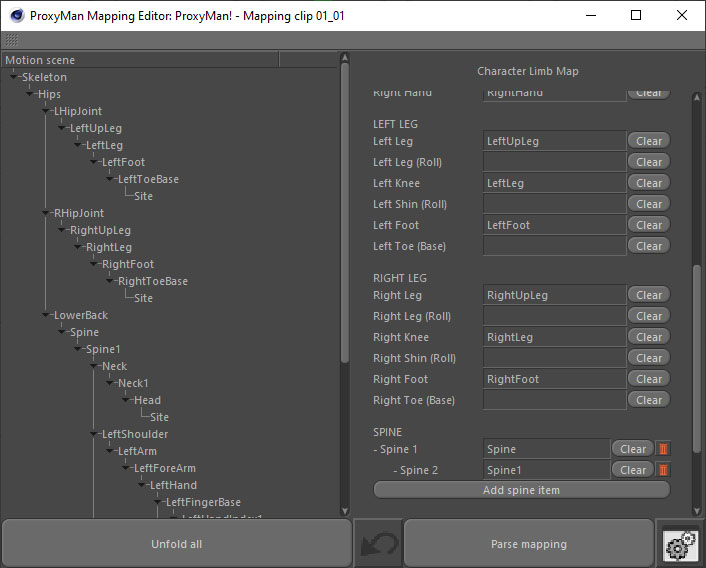
The mapping editor is a really simple concept - just drag and drop the skeleton limbs from the left-hand-side tree view into the appropriate ProxyMan limb field on the right. You don't need to fill them all, only the ones that are relevant. And voila - mapping convention sorted! It's a really handy system, and user friendly, and lets the user choose the correct character convention.
The mapping editor can also help the user map the ProxyMan skeleton too. So, it's useful for more than just motion capture clips.
As well as the mapping editor, I also added blending functionality into the math that calculates the rotation values. I can now blend how much of the motion comes across onto the character. I think this will be handy if I ever need to blend two motion capture files together. For example, if I have two mocap files; one is a walk cycle and another is someone standing still and waving. I should be able to apply the full walk cycle to the whole character, and then apply the arms waving on top of the walk cycle so he waves as he walks. Neat, hey!
I titled the post claiming that he's wriggling - but I haven't shown it. So, here's a side-by-side animation comparison of some motion capture data (left side) and a simple ProxyMan rig applying the motion capture data to it's character rig (right). The rotational mapping seems to be pretty good (see update below!).
Update 13/12/2025
When I saw the animation, my first impression was 'hey, cool - it works!'. But I could see something wasn't quite right about his spine. It just looked a bit too stiff. I checked the mapping of the motion capture and found I'd made a mistake when I set my custom map for the motion clip. I missed that the lowest spine joint is called LowerBack. See - this is why I built the mapping tool, so I could quickly edit custom motion capture skeletons and fix things that might be missed by the engine! You can actually see it in the two thumbnails if you look carefully. When this joint is mapped as the first spine joint, he now correctly bends over. The video below shows the updated animation comparison.
One thing I haven't mentioned before is that I also had to change how the timeline clips work underneath. Beforehand, it was just one frame of ProxyMan equalled one from of motion capture data. However, like video, you can capture motion capture at different frame rates - for example 120fps. If I have a character animation that's 24 frames per second, then one second of motion capture data at frame-for-frame playback would mean my ProxyMan animation would be five seconds long. To combat this I had to add in the ability to calculate the equivalent time between the two scenes so that one second of ProxyMan was the equivalent to one second of motion capture. I can also switch between the two timing methods, so if the motion capture was recorded at 120fps, it would make my ProxyMan character appear to playback in slow motion. On top of that, I also added a custom playback speed to further play with the speed of time.
Now, there's a small thing I haven't completed yet, and that's to do with chains like the spine and neck. They do work, but not quite to the extent that I'd like (and need). I'll blog another post soon about this, as it's a little intricate and needs a bit more of an explanation.
I promised myself that if I didn't have anything out by Christmas, I'd pack this away and just do something else for a while next year. But, this has made things so close now. If I can finalise the spine and neck rotations, all that is left is just the positional data, and we're pretty much there for a first cut. Super close now.