
While waiting for my first tranche of motion capture hardware to arrive, I've been spending time thinking about what I need to make all this stuff work the way I want. As seen in previous posts, I've been developing some helper tools that I hope will be useful for making some of my projects with. This is another one of those helper tools.
The problem I'm trying to address here is that I do some of the animation work in another piece of software. So I need to be able to move between my main animation software and other software. One of these issues is that some of my characters have hair. And while I can use my main animation package for hair, it's better if I can do it in another piece of software.
So, I developed a little export tool that lets me export animated meshes into a well-known Wavefront 'OBJ' format sequence. This OBJ format is an open geometry definition format that other graphics applications can open. It's a simple data-format that represents 3D geometry. My tool lets the user export an OBJ sequence, which can then be imported into another piece of software.
Why would you want to do this? Will, as an example, your character may have hair, but you don't want to make the hair in your 3D application. You want to make it in another program. So, you can export an OBJ and open the file in another piece of software to do the hair grooming and animation.
Another example is blowing up a building. You might model the building in one software, but use another to do all the dynamics and simulation of the building blowing up etc., including the fire, smoke and dust. Being able to export (and import) a sequence means you can grab the model at a particular frame in the sequence - and nothing has to be recalculated. The OBJ format can also hold other information, like UV and texture coordinate data.
It gives you the opportunity to move things between programs.
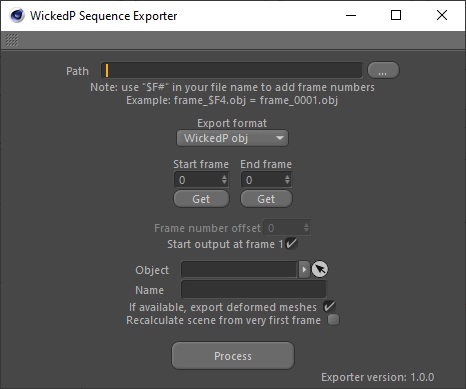
As a small aside note, I also programmed in my own little expression reader. What this means is, in the file name I export my sequence into, I can use an expression which is then replaced with something - like a frame number. For example, I can save my export into the following file path:
- c:/documents/scene/my_character_$F3.obj
And my little expression finder will look for the "$F#" and if it finds this in the path text, it will replace it with the frame number. So the sequence renders out into their own file by frame value. So the example above might look like this:
- c:/documents/scene/my_character_001.obj
- c:/documents/scene/my_character_002.obj
- c:/documents/scene/my_character_003.obj
- and etc.
The image below gives a visual representation of what an output might look like:
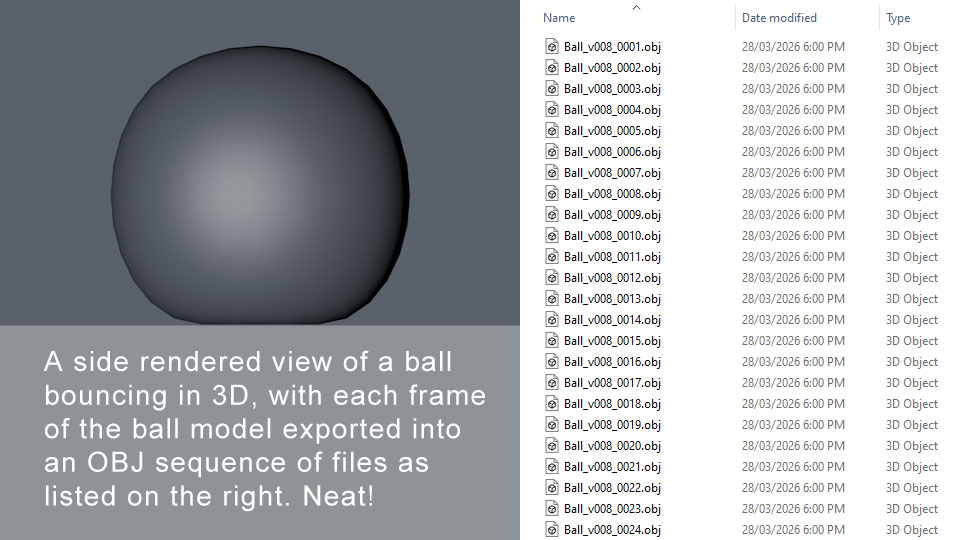
And in other software, I can import the ball above and do something else with it - say make it bounce in a puddle of water and splash the water around it.
And here's a picture of the user dialog:
What's funny about this, is that people had been crying out for years for the main software developer to make sequence exporters just like this. I know my version of the software is years old now, but it's a little disappointing that this wasn't implemented years before even my version. It's been industry standard for a long time to use sequences and exchange formats. They really should have been on top of all this from the get go, even if it wasn't as dense as other format options. It still has a use.
I know it's easy to have a go at developers with these things, but this kind of thing was an industry standard. It really should have been there in the first place. Anyway.
I might make my tools available at some point for others to get, but I need to test them in a short pipeline production myself first before I go making them available for anyone else. I won't be expecting much for them, the software is quite old at this point. But there might be some out there that find it useful for their little productions. Others like me perhaps!
For my needs at least, I've nailed a really important part here. I'm intending to use this tool to transfer the animated ProxyMan character meshes into other software for effects (like hair, or water collision simulations).
Etching ever so closer to a first production now.