
As I sit patiently waiting for the remaining motion capture gear to arrive, I've been working on really trying to clean up and tie off loose ends with my ProxyMan tool. Having already done quite a lot of work, I felt it was time to start shaping things into a first production working version.
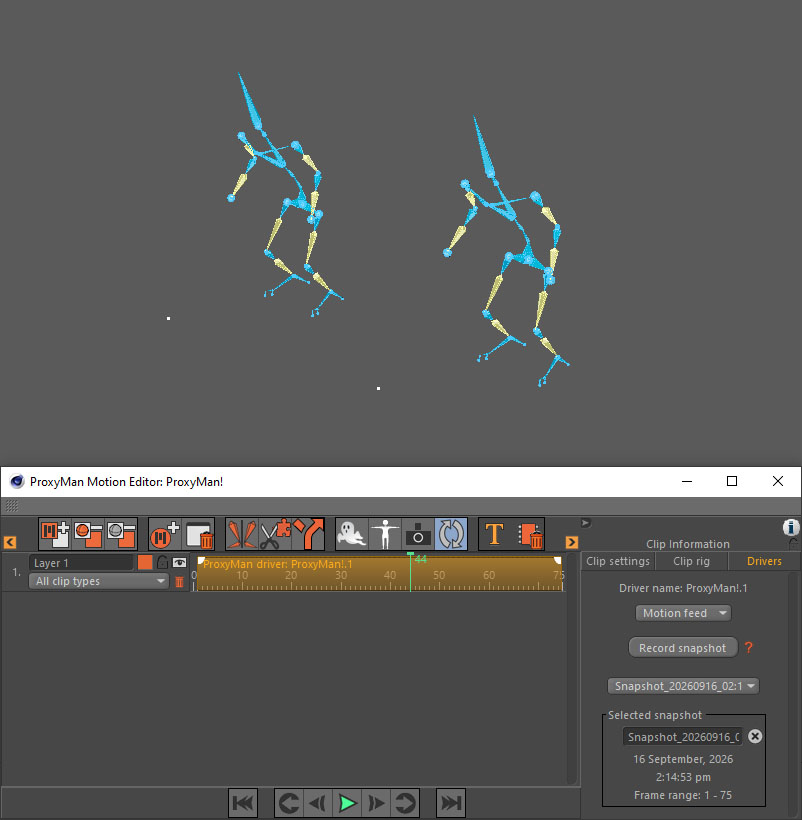
One of the things I had in the back of my head for sometime was to create a mechanism that would let me drive one character rig by another. This would be useful for example, to animate a proxy version of the character model, then translate the animation over to the more final version for rendering. I picked this up recently and decided to make a solution for myself. I made a new clip type for the motion systems, called ProxyMan Driver clips, so that I could do just this.
But I had some epiphanies about it. I realised if I could read it, which I now can, then I should also be able to do something like record it. This brings along added benefits because if I can record another rig's animation, then I could use the available clip options that help to change the speed and frame offset of the animation. I also had the thought that if I could capture another character's animation, I could also capture the current rig's animation.
Why? Well, I can add multiple motion systems to a single ProxyMan object. And I could do my base animation on one system, capture it, then copy the clip to a new system and continue working with it. I could then use other clip options, like the internal frame range, to make further adjustments to the animation. I could, for example, make a walk cycle, capture the animation into a new clip, play with the speed, change the starting place etc. and etc. And, I can then extend the clip to play much longer, so that the walk cycle continues beyond it's original animation. So, built a walk cycle for two seconds, capture it, then have it loop over 25 seconds. Great!
So, how would one do all of this? Well, my solution works like this: I had to create a new set of functions that would take a 'snapshot' of the current ProxyMan animation state across a specified frame range. In most cases, it would be the whole scene length. But for a walk cycle you might only want the first ~50 frames, so that you can loop it later. My snapshot capture does just this. It captures all the rig's limbs and their states across the frame range and stores them. And because it's now a stored piece of data that doesn't change, it acts a bit like a motion capture clip. That is, I can get data at any 'time' within the data set. I'm not bound to the current scene frame, I can grab the animation state at any frame inside the frame range.
It also means I can change the clip speed, and calculate in-between frames (blend between two frame states), among a raft of other useful options.
And the snapshots can be taken at anytime. I even built in a history of snapshots, so that I can store a number of them in the one ProxyMan Driver clip. Means I can switch between different snapshot versions. And like any other clip type, I can copy the clip and use it somewhere else on the timeline. It's just a really smart piece of functionality (I think...). I can see it serving multiple purposes in the future.
Things are really starting to shape up nicely with this tool now. I'm really looking forward to tackling a project with it.