
Some years ago, when the little business I was working for closed down, upon letting us go they allowed us to take home our computer if we wanted too. My little box has been pretty good to me. The IT guy that put it together chose some good specs for my needs at the time. A couple of years later and now finding myself needing a machine to manage a motion capture system I've ordered, and I thought this little machine might fit the purpose nicely.
It isn't a giant workstation with expensive graphics cards. On the contrary, it's a simple machine with enough bits and pieces to do most office-based admin-style jobs. I installed some software on there a few months ago (might have been late last year) and during a four day render, the computer died. I'm not entirely sure what happened, but I suspect the CPU is dead. I bought some new and faster ram, hoping that might have been the issue. But alas it wasn't. So I ordered another CPU, which is also faster and has more cores than the previous, and a new AIO watercooler to go with it. AIO coolers are self-contained water coolers. Instead of just fans inside the box, I have a water cooler. Rendering can be quite punishing on the machine, so I thought it best to look after the new CPU with a better cooling solution than the default fans that it came with.
Today, a new mounting bracket for the cooler arrived. So I spent some hours installing the new CPU. Yep, hours. Because, there were no instructions for the mounting brackets, and it wasn't immediately obvious how they were meant to go together. In the end, one of the cooling parts threw me off down the wrong pathway - it was a real red herring. Once I realised this, things went together pretty well. The new CPU, cooler and RAM should provide better performance than what was in their previously.
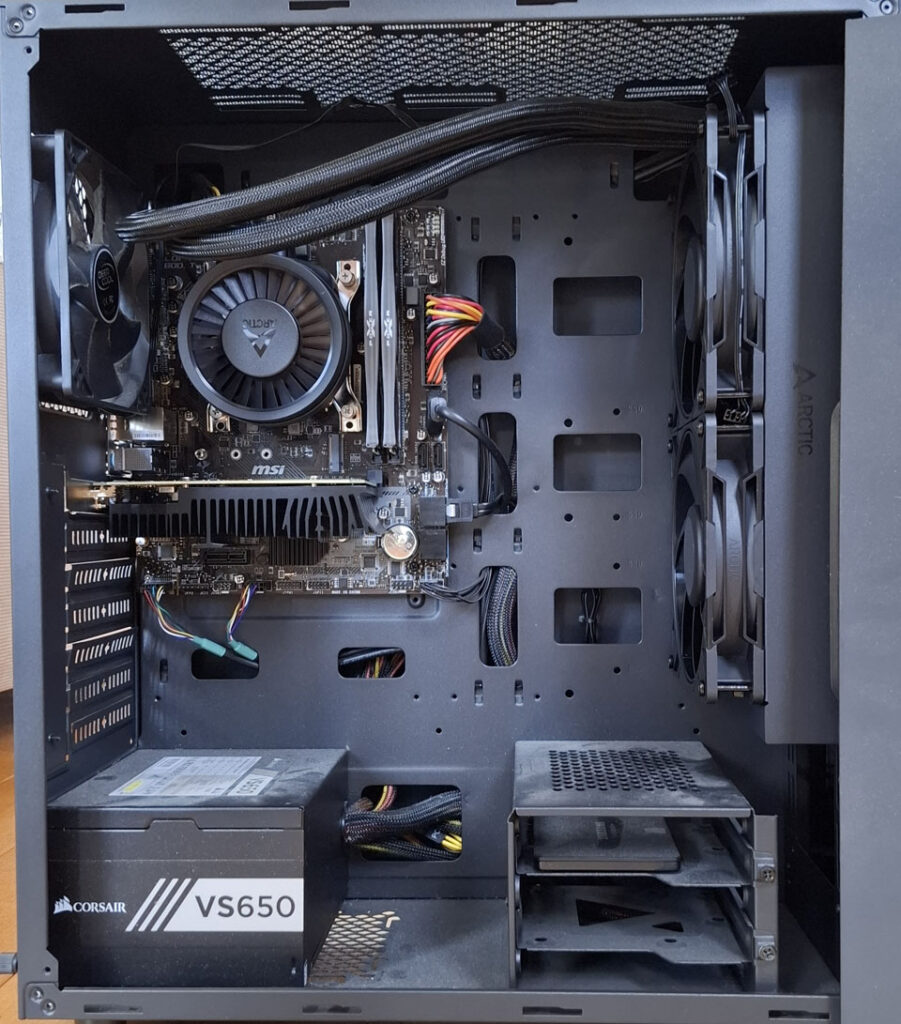
It's all black as you can see. The motherboard is quite small, only has two RAM slots, once graphics card slot and two PCIe 1.0 slots. I didn't get any RGB lighting stuff. As fancy as that looks, I'm not really interested in flashy lights. Funnily enough my main computer does have an RGB fan cooler for the CPU! Although glancing at it as I type this post, I can see the lights aren't working... they must have died. I'm not fussed though, I don't need the RGB stuff.
For anyone interested, the cooler is an Arctic Liquid Freezer Pro III, an AIO watercooler (that's what those hoses are for). It's the 280mm variant. Unfortunately, it doesn't quite fit above, so had to mount it on the front side. It's about as best as I could do. Parts of the motherboard get in the way at the top, there just isn't quite enough room to fit it there. But I doubt it will matter much to me.
At this point, I'm just waiting on a new PCIe network card, which I need to connect up the switch and motion capture cameras.
So, the old work machine will become the motion capture station. I'm hoping it's quiet enough to sit in rooms with people and not disturb them. That way I can plug it in somewhere and render things if I need to. The new CPU is faster and has more threads than my current main computer, but I won't swap them over. The main one has everything I need on there, including my code and other project stuff etc. The computer might be more than fifteen years old, but it just works.
I'm hoping the graphics card in the old work machine will be enough for the mocap system. I'm not really wanting to drop a thousand dollars or more on a new graphics card at the moment. What has me a little worried is that I intend to run the virtual viewport through this system as well as the mocap system. So I'm not sure if it will handle the graphical stress of two viewports yet. But, I could buy a newer card if I really need to, and maybe just swap it over with the one in my main machine. The mocap station doesn't need cutting edge graphics performance. It just needs to serve its purpose. But I'll deal with that when I can hook everything up.
The old work computer died when it was halfway through a render. I'm still yet to see how far it got, or the frames that it rendered out. It was just a turntable of a 3D character from one of my projects. But he has a lot of hair, so doing all the calculations for that per frame became pretty computationally heavy for the poor machine. I guess it just caved under the heat. Hopefully the updated CPU and watercooler, and faster RAM, will make for better overall performance. It's hard to put a number on it, but the specs suggest I should be able to knock around a quarter of the rendering time off. Maybe a little more. Be interesting to see how the new system handles that.
As for the render itself, well I haven't seen it yet. I rendered to separate frames (as you should!). So however far it got through, the individual frames should still be there. Hopefully I can pick up from where it dropped off and finish it. Otherwise, I could always start it again. Either way, might be a good first test for it. Would like to post the results somewhere if I can.