
I took delivery of three separate deliveries on the same day earlier this week, and that was by lunchtime!
I've posted many times before on making my own tools to work with motion capture. I haven't posted so much about getting a mocap system though. Eventually I had to make the dive, because I wanted to realise some projects that use motion capture. So I planned to get half a system to begin with. I designed the system like this so that I could learn the software, learn to set thins up, and perhaps learn some simple object tracking with a minimal system. With this in mind...
I received the first parts of the system I'm putting together. The first pieces to arrive have been a switch, network cables, two handheld camera mounts and a wireless monitor and transmission feed. Among a couple of other things.
The initial objective is to do some basic object tracking. But I've decided to take it a step further, and instead of plain object tracking I'm going to try and create my own virtual cameras. To track an object is cool, but I thought if I could track an object and translate the positional and rotational data to a camera instead, I could use that to animate 3D cameras in a scene. I thought it would be more beneficial to figure out a virtual camera like this instead of just plain object tracking. And having a virtual camera with a monitor that can show the live feed can be used in a number of applications, not just in filmmaking.
In a recent post I explained that I made another tool, one that uses the motion capture software's SDK to get live tracking data out of the motion capture system itself. The purpose for me here? Well, I bought a diver's camera mount and another film camera mount, both of which have arrived. They're the kind of mount you can put a GoPro on and go diving with. the other is more for film cameras, but they both do the same thing. I won't be diving with either of mine. Instead, I'm going to attach some tracking markers to the mounts, and try and object track the camera mount.
And in doing so, using my little tool that talks to the motion capture software, I hope to track the camera mount and pull the tracking data into my tool, and apply the spatial translation to a camera inside my 3D application in real-time. I also bought a wireless monitor so that I can receive a real-time 3D viewport through the 3D camera. I'm not sure how I'll connect this up just yet, though I have a few ideas.
In the image below, is one of the mounts I bought. The other can be seen in the hero image of this post above. So I have two cages available to me. They were both slightly less than half price, so I bought both to try out. And if they both work, I could use them as two individual virtual cameras! Though I'd need another wireless monitor feed to see the second.
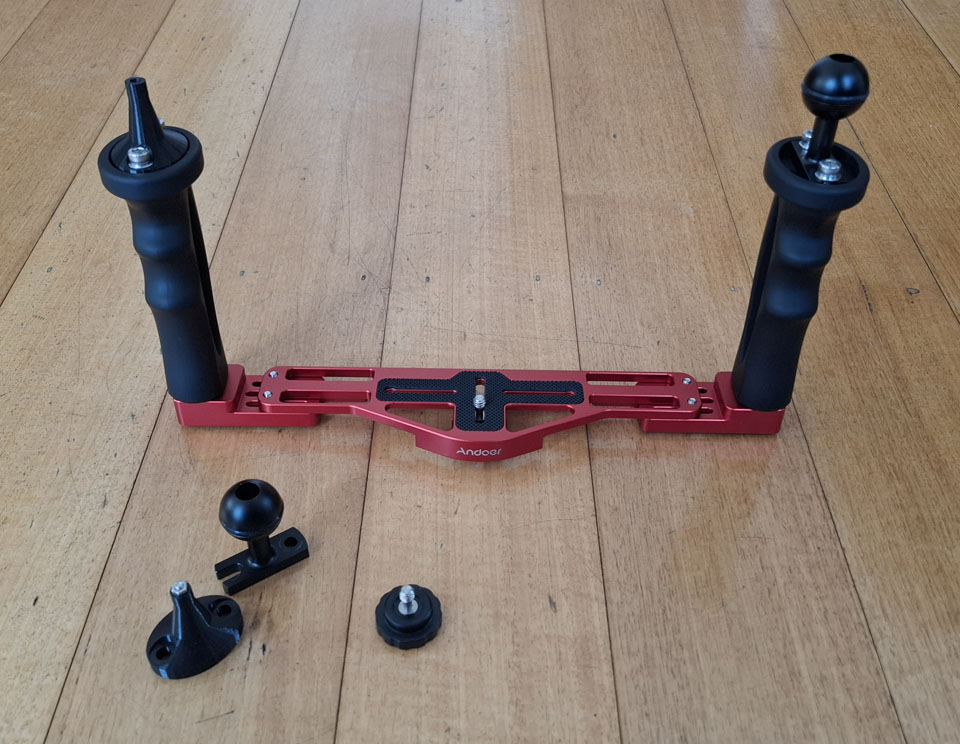
You'll notice there's a couple of 3D printed pieces there as well. I've started to think about how I'll need to mount some of the reflective markers. This won't be much fuss, I could literally glue them on anywhere if I wanted to. But I'd prefer a proper mount, so made a simple marker mount to go on one of the cage's handles.
The main motion capture is still another month and a bit away. And a few other bits and bobs. But still, things have started to arrive.
Among the early deliveries, I also got some UV setting resin. I didn't order that for the mocap, I got it for other endeavours. Nevertheless, I thought it might come in handy if I needed to make some trinkets and objects to track in the motion capture system, or for sticking reflective markers on objects - like camera mounts!